LeadConnect
Deliver leads to your phone for instant connection!
LeadConnect instantly connects you by phone with consumers the moment a lead is generated on HAR.com or through the HAR.com app -whether from your listing or Agent Profile.
This feature lets you respond to inquiries immediately, increasing your chances of turning leads into closings.
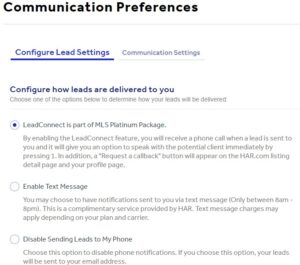
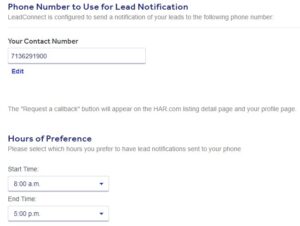
LeadConnect sends call notifications to your preferred number. Consumers and agents can reach you quickly by selecting “Receive a Call Back” on your listings or Agent Profile.
How LeadConnect Works
Consumers have the ability to contact an agent or a broker when viewing a listing on HAR.com to obtain more information about the listed property. For example, a consumer may simply click on ‘E-mail Agent’ or ‘Schedule Showing’ to submit his/her contact information to the listing agent. In submitting contact information through ‘E-mail Agent’ or ‘Schedule Showing,’ a consumer is requested to enter his/her telephone number. As soon as the information is submitted, a lead is generated to the listing agent. With LeadConnect, this scenario remains true except that in addition to an e-mail lead being generated, the listing agent will now be connected over the phone with the consumer — instantly.
To access your LeadConnect settings
This is how it works:
- Consumer is requested to enter his/her phone number.
- Lead Connect technology connects to the listing agent first
- Listing agent now has the option to:
a) accept the call from the consumer or b) deny the call - Once the listing agent chooses to be connected, HAR.com connects the listing agent to the consumer
- Consumer answers
- Consumer and real estate professional are now connected
How LeadConnect Benefits You
- Impress consumers with fast response time
- Never miss a lead, calls forwarded to any desired location
- Member service offered to you by HAR at no additional cost
- Call tracking by individual listing and Caller ID information
Additional benefit
Your LeadConnect will be also configured for another tool, Request a callback.
Click here to learn more.